Your Ad Here
May 10

If you’re feeling guilty about the conditions the workers who made your smartphone had to endure or the number of air miles your device managed to rack up while winging its way to you, there will be something you can do to balance your karma.


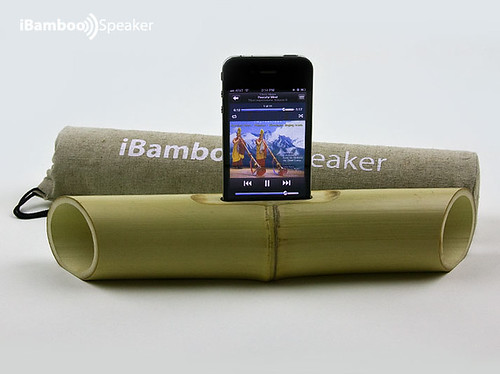
The iBamboo iPhone speaker dock is a completely green iPhone speaker docking solution that will amplify any audio content emanating from your Apple handset without using any electricity whatsoever.


Although the simple yet stylish device won’t have the neighbours hammering on your wall in an effort to get you to turn the music down, the iBamboo serves as a straightforward and effective way to amplify music or speech content played on your iPhone.


The way the device works is pretty simple; the user slots his or her iPhone into a small opening at the top of a one-foot-long piece of bamboo. The natural shape of the bamboo serves to amplify the content played while also creating a “pseudo-stereo effect” as the sound exits either side of the wood.


Interested iPhone owners can purchase the iBamboo speaker dock in traditional bamboo, or at least they could if it wasn’t currently sold out, but will soon be able to get one made of plastic. The new plastic dock will apparently provide a cleaner and crisper sound which is more suitable for “urban use”. Those who like to coordinate their smartphone accessories can also avail themselves of a bamboo iPhone cover, available from the same company.


At the moment, the iBamboo speaker dock is only compatible with the iPhone 4 and the iPhone 4S, although Anatoliy Omelchenko of Triangle Tree who designed the device says he is working on models that will be compatible with older iPhone handsets and other Apple devices such as the iPod and iPod Touch players.


Anybody interested in picking up an iBamboo speaker dock (the company is based in the US but ships internationally) can sign up for notifications as to when they will be available again. The recycled plastic version is expected to sell for a very reasonable $30. Obviously though, the device will not charge your phone.


Source Best-Mobile-Contracts.

[Slashdot] [Digg] [Reddit] [del.icio.us] [Facebook] [Technorati] [Google] [StumbleUpon]
Nov 10

We are now registering for Apple Developers Accounts the total price with a certificate and UDID registration is $7.99 for a full year. Use paypal form below your certificate will be emailed to you with in 24 hours (usually an hour), please include the UDID of your iOS device.

WE ARE NOT ACCEPTING REGISTRATIONS AT THIS TIME.

Ability to use iOS Betas and use iResign to sign and use cracked apps with out Jailbreak.


[Slashdot] [Digg] [Reddit] [del.icio.us] [Facebook] [Technorati] [Google] [StumbleUpon]
Nov 05


Well Since the iPhone 4s and iOS 5 JailBreak is not available for the masses yet people have to resort to using other methods and here is how to do it.

We are now accepting UDID registration and certificates. Please register for this site and leave a commet below you will be contacted by site admin shortly. Please leave a commet or email macgeekworld@gmail.com or maingeek@macgeekworld.com. This is a low, low price of $7.99 for a full year UDID and Certificate + MobileProvision Profile.

Includes:

  • UDID Registration for your IOS Device (iPhone, iPod Touch, iPad, AppleTV2)
  • Certification (for iResign, also can be used with iPaGoD and CrappStore)
  • MobileProvision profile (need to run apptrackr.org apps)

Again this is only a referral service we do not register or provide access. Please leave commets below and you will be contacted shortly or email macgeekworld@gmail.com or maingeek@macgeekworld.com.

Instructions:

First and formost you need eater a developer account which is $99 at Apple or to have some one register your UDID

here you can find instructions on how to install OSX on Windows or ESXi Machine


OS X is required for this

1.) Download/Install iResign: (Download) http://www.2shared.com/file/hJ_YHugi/iReSign_20.html


Other places to Download iResign: http://imzdl.com/ or http://betaio.so


2.) Take the certifications and other files send to you when registered, this includes the cer file and p12 file


3.) Open up Keychain Access (Go to Spotlight and search for it)


4.) On the left side, select “login” under Keychains and “My Certificates” under Category. Once this is done, drag and drop the AppleWWDRCA.cer, Certificates.p12, and developer_identity.cer into Keychain Access.


5.) When prompted for a password use the password provided to you via email


6.) Plug your iDevice into your computer and then open iTunes. Drag the .mobileprovision file in iTunes over the “Library” section (you will see a green plus arrow). Or email the certificate to your self and open it up on your iOS device


7.) Go to http://apptrackr.org/ to download the application you want on your iDevice


8.) Open up iResign 2.0


9.) First, you must find the Certificate name. This can be found by going into Keychain, right clicking your certificate, and selecting Get Info. Copy/Paste the “Common Name” from Keychain into the “Certificate Name from Keychain” line in iResign. [ex. iPhone Developer: First Last (ABCDEFG)]


10.) Click and Drag  the .ipa file you downloaded from AppTrackr and click ReSign!


11.) iResign creates a folder on desktop “ResignedApps”, Drag and drop the newly signed file into iTunes [has "resigned" in the name]


12.) Sync and enjoy!


Troubleshooting:


* No Identity Found Error means that you did not type or copy the “Certificate Name/Common Name” correctly.


** If you are able to resign apps in iResign but cannot sync, this means your provisioning file is not installed correctly on your iDevice or you are syncing unsigned iPA’s in iTunes

.

[Slashdot] [Digg] [Reddit] [del.icio.us] [Facebook] [Technorati] [Google] [StumbleUpon]
Oct 20

Dev team today release pwnage tool which will jailbreak a whole slew of devices:

We’re pleased to release PwnageTool 4.1 for Mac OS X (free of charge, blog ads, and donation requests — as always!).  Today’s big new addition to the jailbreak family is AppleTV 2G, which was first shown jailbroken in its release week!

Through a combination of the recently released geohot limera1n exploit@comex’s recently released pf kernel exploit, and our original pwnage2 exploit, PwnageTool 4.1 works untethered on these devices at firmware 4.1:

  • AppleTV 2G
  • iPad (firmware 3.2.2)
  • iPod touch 4G
  • iPod touch 3G
  • iPhone4
  • iPhone 3GS
  • iPhone 3G

Here is a local link for download http://macgeekworld.com/PwnageTool_4.1.dmg

[Slashdot] [Digg] [Reddit] [del.icio.us] [Facebook] [Technorati] [Google] [StumbleUpon]
Sep 22

Google today added GMail push for active sync devices, which of course includes iPhone. Check it out at Google Mobile Blog

[Slashdot] [Digg] [Reddit] [del.icio.us] [Facebook] [Technorati] [Google] [StumbleUpon]
Sep 01

122143-apple_media_event_500

Probably no Tablet, but some nice new iPods with cameras and maybe 3.1 ……

[Slashdot] [Digg] [Reddit] [del.icio.us] [Facebook] [Technorati] [Google] [StumbleUpon]
Jun 30

= 3GS

Last few days have been very frustrating, iPhone Dev decided not to release new Jailbreak for all of the 1 million people that are waiting for it, just because they feel that by not releasing today they will help more people, I think they will hurt more people then help, specially if Apple patches there jailbreak and unlock and we will have to wait even longer…..  The logic of dev team is truly bad and presents a question: Why ever release anything or hack anything if some one is going to patch it or some one didnt get a chance to buy something?

I`m sorry, but I feel that iPhone Dev team major fail here …………..

[Slashdot] [Digg] [Reddit] [del.icio.us] [Facebook] [Technorati] [Google] [StumbleUpon]

Your Ad Here